Open source · bring your own server

The open internet, on infrastructure you own.

Collateral stands up a stealth proxy on your own free cloud VM and routes your whole machine through it, from your terminal, in about two minutes.

$ npx getcollateral
no account · no subscription · macOS + Linux today
Rather not live in a terminal? Collateral for Mac is a native app with the same tunnel underneath. Free for 7 days, then $15 for the first 50 buyers and $25 after.
collateral_ connected
proxysocks5  127.0.0.1:1080 endpointwss://example.com/9f3a2c7b key3d9a7f2e-1c84-4b6d-a05f-8e21c9b4d7f0 exit ip203.0.113.42 transportVLESS · WebSocket · TLS · :443
s  first-time setupc  disconnect t  test connectionw  set server address u  set access keyg  generate new key d  system proxy: offf  full tunnel: on x  share config (QR)i  import (scan QR) p  proxy setup helpq  quit
Connected, traffic exits via 203.0.113.42.
Why

You shouldn't have to hand your traffic to a stranger.

The usual ways out of a locked-down network share one flaw: something in the middle that everyone else is on too.

Shared VPNs

Thousands of people behind one endpoint. Easy to fingerprint, easy to block, and they log your traffic anyway.

Paid tunnels

A monthly bill to route your packets through a stranger’s server, and it gets blocked all the same.

Collateral

Your server. Your IP. Your traffic. No shared endpoint, no one in the middle. Nothing common to log or ban.

How it works

Two commands. About two minutes.

01

Get a free VM

An Oracle Cloud Always-Free ARM instance, free forever. Open ports 80 + 443 once in its console.

02

Point Collateral at it

Enter the IP, SSH user, and key path. It SSHes in and sets up the proxy, HTTPS, firewall, and a background service, automatically.

03

You’re connected

Toggle device-wide and your whole machine exits through your own server, looking like ordinary HTTPS the entire way.

packet flow
you your computer TUN · all apps
your VM Oracle Free stealth proxy
destination the open web unfiltered
Features

Yours, end to end.

01

You own it, end to end

Not a shared VPN thousands of people sit behind, blocked and logged. Your own server, your own IP. Nothing common to fingerprint or ban.

02

Looks like plain HTTPS

VLESS over WebSocket over TLS on :443. On the wire it’s a normal request to a website; an active probe just gets an innocuous decoy page.

03

It builds the server for you

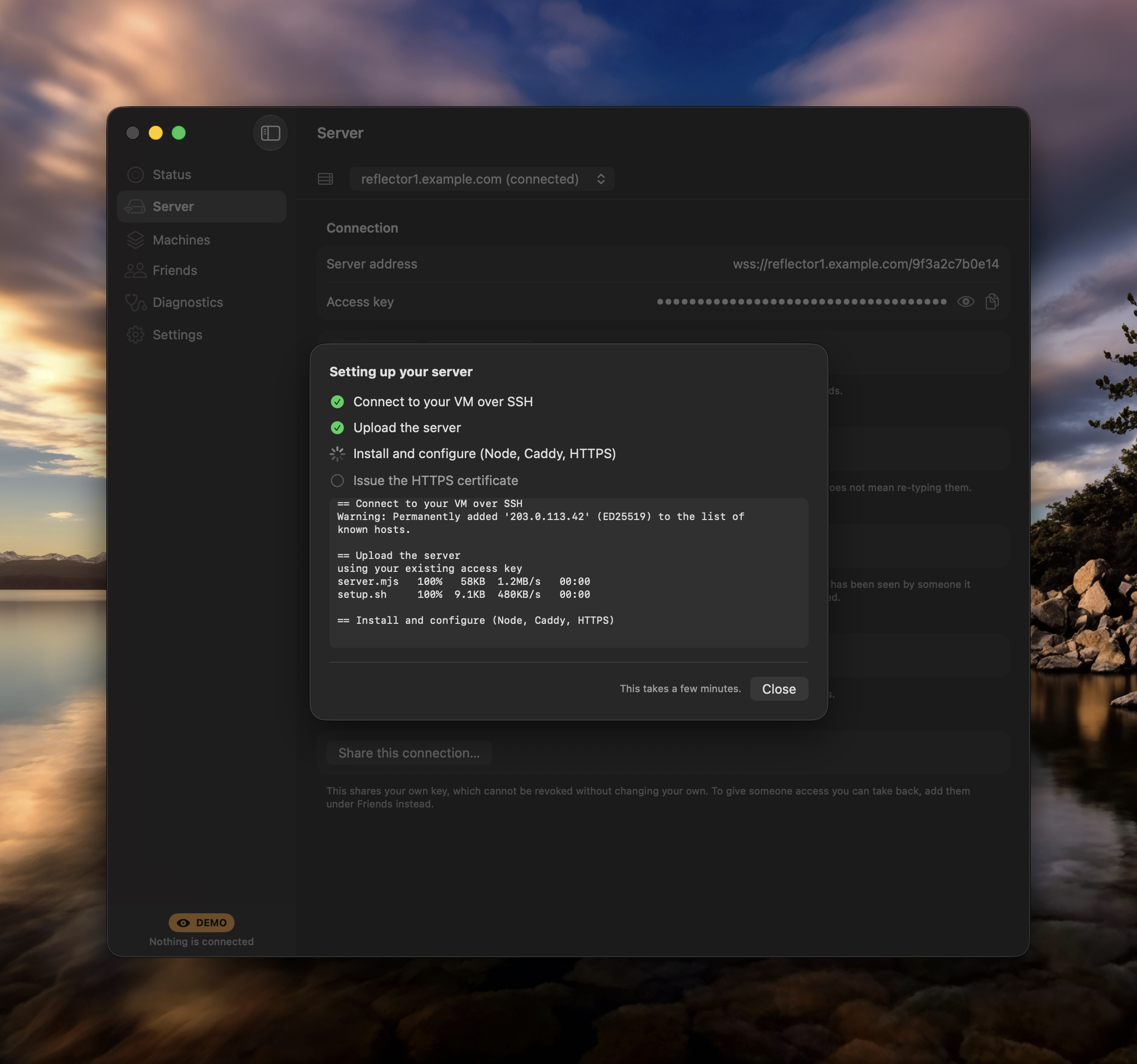
Point it at a fresh Linux VM. It installs everything (proxy, auto-HTTPS via Caddy + Let’s Encrypt, firewall, a service) and connects. Like Outline Manager, but stealthier and free.

04

Free forever

Runs on an Oracle Cloud Always-Free ARM VM. No subscription, no metering, no card on file.

05

Real device-wide

A VPN-style TUN captures everything: TCP and UDP. QUIC / HTTP-3 and games like Roblox, not just browser tabs.

06

Bring your own domain

Optionally point a domain you own at the VM. Your endpoint looks like an ordinary personal site, with no shared *.sslip.io pattern to block wholesale.

+ One-scan onboarding Share your config to another Mac with a QR you scan from the camera.
+ Auto-reconnect Self-heals when the server blips. You stay online without noticing.
+ Zero dependencies Pure Node built-ins. Nothing to npm install, nothing to audit.
+ Clickable TUI Mouse + keyboard, scroll-locked like vim and htop.
Mac app

The same tunnel, without the terminal.

Collateral for Mac is a native app: a menu bar toggle, a real window, and a system network extension that carries every app on the machine. It builds the server for you over SSH, hands out and revokes keys for friends, and tells you which part is broken when something is. The terminal app stays free and open source; this is for people who would rather click.
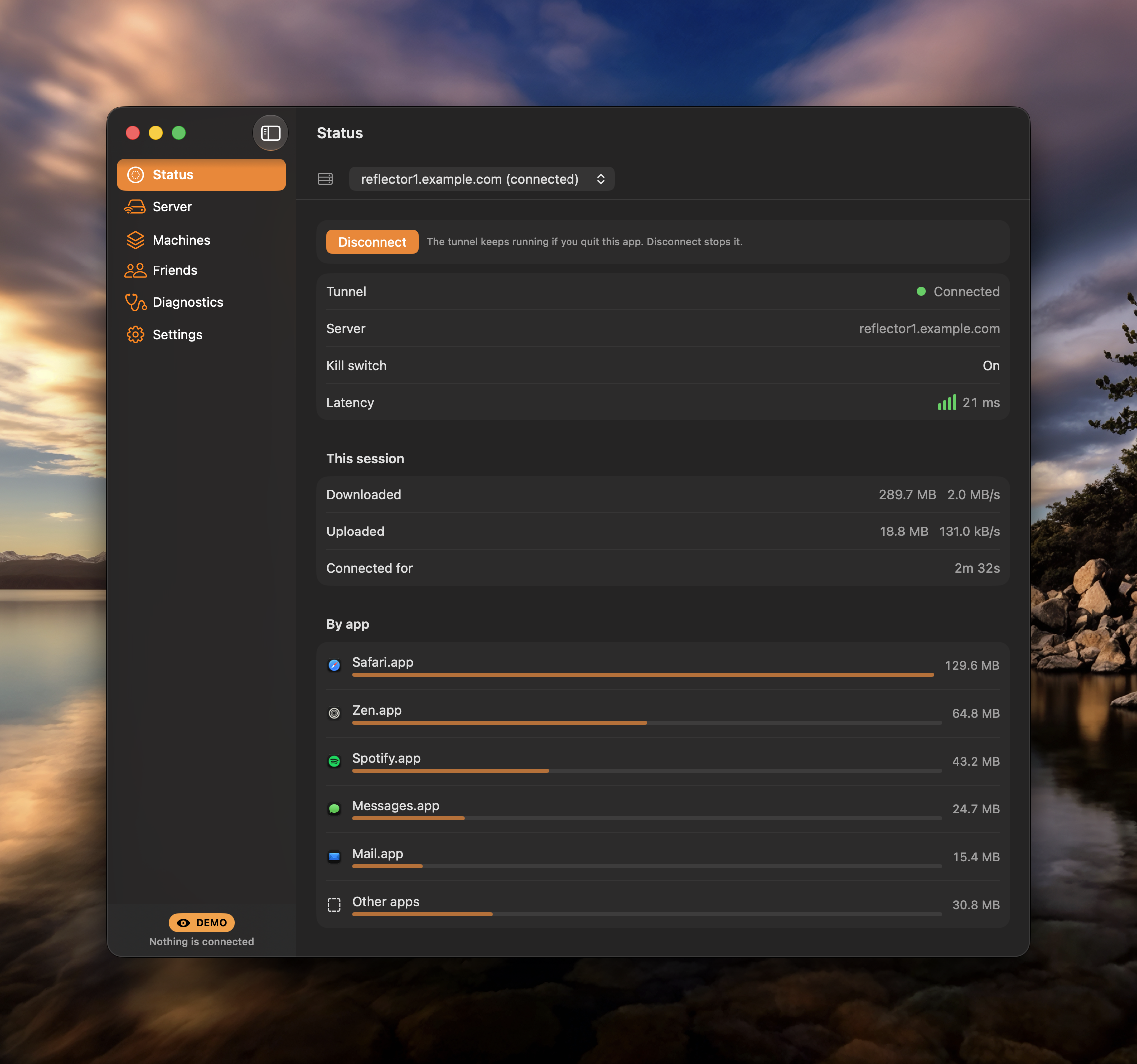
The Status pane: tunnel connected, latency, and this session's traffic broken down by app.
Status · what is connected, how fast, and which apps are actually using it.
The setup sheet working through connecting over SSH, uploading the server, installing, and issuing an HTTPS certificate.
Setup · point it at a bare VM and watch it build the thing.
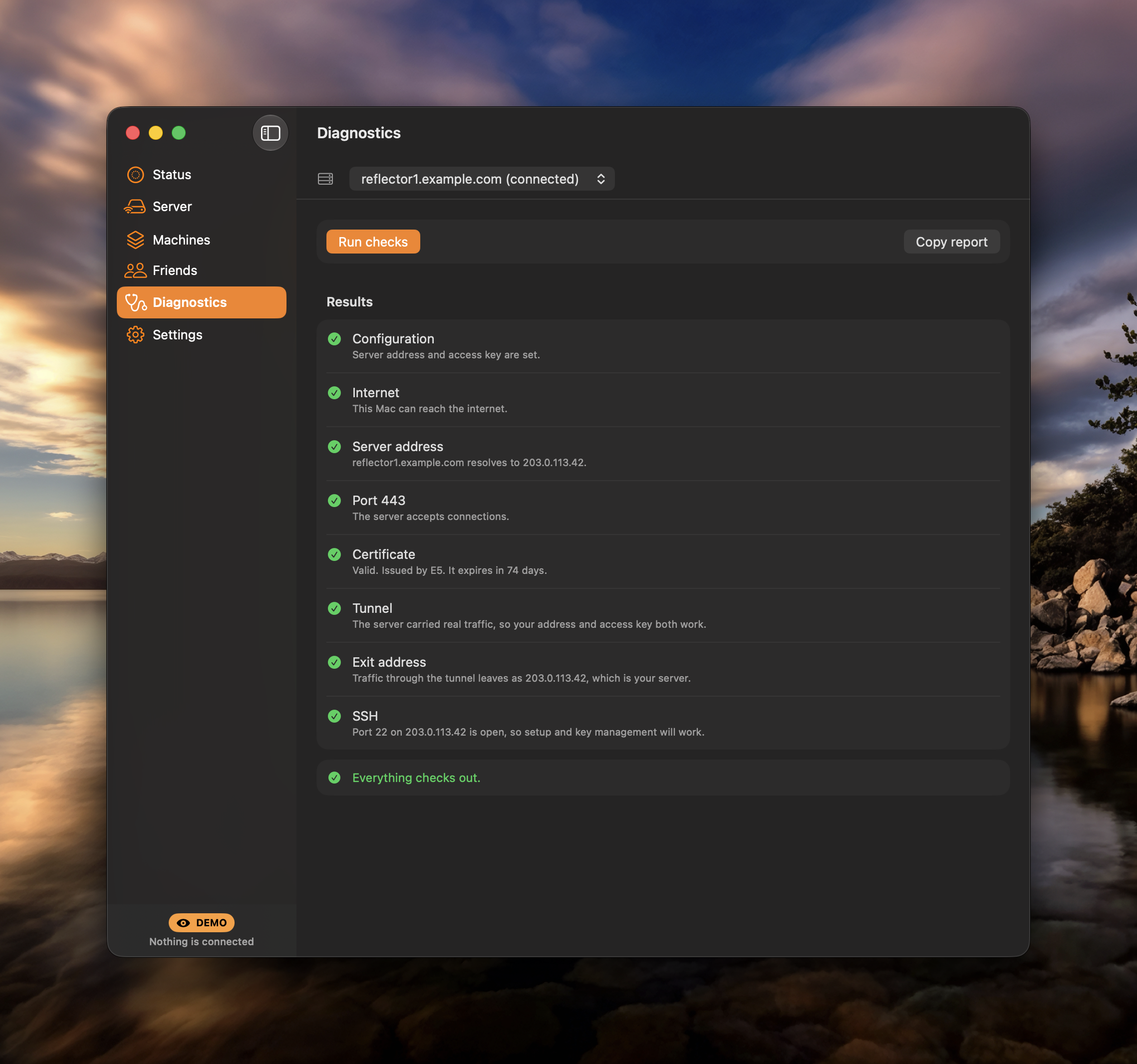
Diagnostics listing configuration, internet, server address, port 443, certificate, and tunnel checks, all passing.
Diagnostics · every link in the chain checked separately, so you know which one failed.
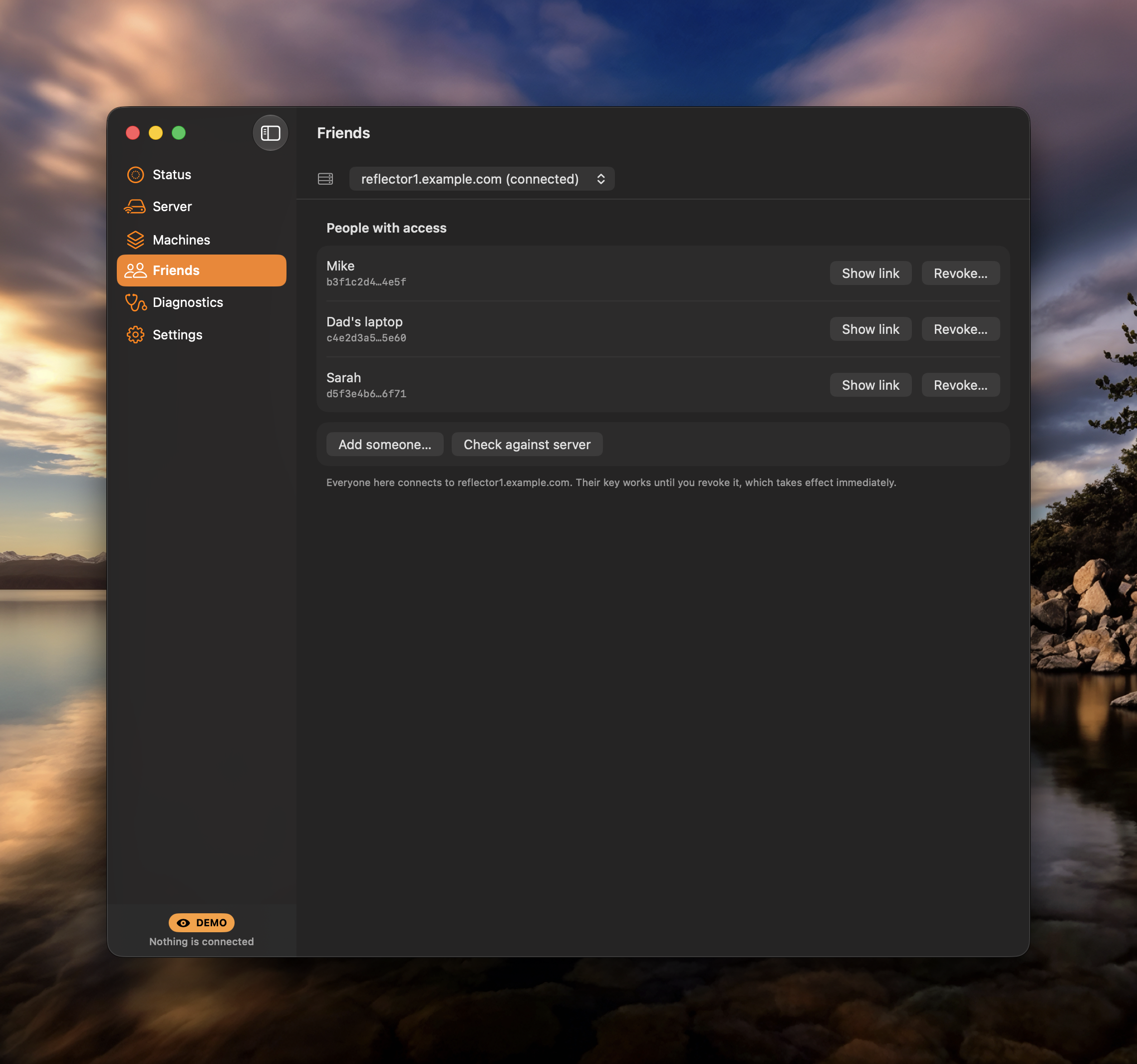
The Friends pane listing people with access, each with buttons to show their link or revoke it.
Friends · hand someone their own key, take it back whenever you like.
Every app, not just the browser

A system network extension, so TCP and UDP both go through it. A kill switch stops traffic leaking if the tunnel drops.

Runs your servers

Set up a new VM, keep several and switch between them, rotate a key everywhere at once, and hand friends their own key you can revoke later.

Says what is actually wrong

Diagnostics test each hop on its own, and the status never claims to be connected when nothing can get through.

$15 $25 USD · one time · not a subscription
40% off for the first 50

Free for 7 days, no card and no account. One purchase covers unlimited Macs and every future version. The discount is applied for you at checkout, no code to remember.

macOS 15 or later · Apple silicon + Intel
signed and notarized by Apple
bring your own VM, the free tier is plenty
Download the trial Buy a licence drag it to Applications when it opens
On the wire

It looks like a website. On the wire, it is one.

Every byte leaves your machine as VLESS wrapped in WebSocket wrapped in TLS, on port 443, the same envelope as any HTTPS page load. There’s no signature to match and no handshake that stands out, so a network filter sees a visit to a website and waves it through. An active probe that knocks on the door gets exactly what it expects: an innocuous decoy page.

what the network sees
GET / HTTP/1.1
Host: yoursite.example
200 OK · text/html
a perfectly ordinary website.
what you’re actually doing
» full-tunnel · TCP + UDP
» QUIC · HTTP/3 · calls · games
» the open internet, unfiltered
on infrastructure only you control.
Get started

Bring a VM. Paste one command.

01  A free Oracle VM Always-Free ARM instance. Open ports 80 + 443 in its console, once.
02  Node ≥ 22 On your own machine, to run the terminal app. That’s the whole prerequisite list.
# run the terminal app
$ npx getcollateral
# or install it once, then just run: collateral
$ npm i -g getcollateral

Prefer to read the source first? Clone it from the repo and run npm start. It’s one more place the download can’t easily be blocked.

FAQ

Questions, answered.

The terminal app is free and open source, and the server it builds for you runs on an Oracle Cloud Always-Free ARM VM, free forever. The Mac app is $25 once, currently $15 for the first 50 buyers, free for the first 7 days with no card and no account. Nothing here is a subscription, and there is no metering.